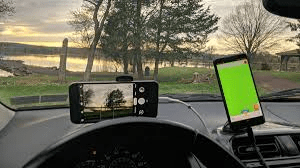
Now road safety matters more than ever. Many drivers want dashcams but hate the high prices. Therefore, smartphone dashcam video recording is a brilliant alternative. You likely have a high-quality camera in your pocket already. Thus, you can record every trip for free. Meanwhile, this guide shows you exactly how to set up your phone for maximum evidence.
Also Read | Imran Khan and Bushra Bibi Sentenced to 17 Years in Jail
Why You Need a Dashcam Today
Now road accidents happen in seconds. Usually, it is one person’s word against another. Therefore, video evidence is a game-changer. It protects you from false insurance claims. Meanwhile, it helps police identify reckless drivers.
First, consider the cost of traditional hardware. Good dashcams cost between ₹5,000 and ₹15,000. Next, think about your smartphone’s power. It has a better processor than most cheap dashcams. Thus, smartphone dashcam video recording offers superior clarity.
So why wait for a delivery?
First, you can start recording today. Then, you can save that money for fuel. Finally, your phone’s GPS can track your speed too. Therefore, the benefits are clear.
Still, you must set it up correctly. Wrong placement can lead to blurry footage. Thus, let’s look at the gear you need.
Essential Gear for Your Setup
Now you cannot just hold your phone. That is dangerous and illegal. Therefore, you need a few basic tools.
First, buy a high-quality windshield mount. Avoid the cheap, shaky ones. A steady mount ensures clear video. Meanwhile, it prevents your phone from falling. Thus, choose a “suction-cup” style for the best grip.
Constant Power
Next, get a fast car charger. Recording video drains batteries very quickly. Therefore, your phone might die in an hour without power. So keep it plugged in. This ensures your “witness” never falls asleep.
Storage Space
Finally, check your phone’s internal storage. High-definition video takes up gigabytes. Therefore, clear out old photos before your trip. Or, use an SD card if your phone supports it. Thus, you won’t run out of space mid-drive.
Top Dashcam Apps for 2026
Now your standard camera app isn’t enough. It won’t record in a loop. Therefore, you need a dedicated dashcam app.
DailyRoads Voyager
First, DailyRoads Voyager is a veteran choice. It records continuously. Meanwhile, it captures GPS coordinates and speed. If a crash happens, it saves the video automatically. Thus, it is very reliable.
AutoBoy Dash Cam
Next, try AutoBoy Dash Cam. It has a very clean interface. Therefore, it is easy to use while parked. It supports background recording too. Thus, you can use Google Maps at the same time.
DashCam Travel
Finally, consider DashCam Travel. It offers great cloud upload features. So your footage is safe even if the phone breaks. Therefore, pick the app that fits your storage needs.
Not all apps are free. Still, most offer a robust free version.
Also Read | Imran Khan and Bushra Bibi Sentenced to 17 Years in Jail
Step-by-Step Setup Guide
Now let’s get your phone road-ready. Follow these steps for perfect results.
Install the App
First, download your chosen app. Open it and grant all permissions. Therefore, it can access your camera and GPS.
Mount the Phone
Next, place the mount on your windshield. Choose a spot near the rearview mirror. Meanwhile, ensure it does not block your view. Safety comes first. Period.
The Perfect Angle
Then, adjust the camera angle. You want a wide view. Capture the road and a bit of your hood. This provides a better perspective for depth. Therefore, insurers can see exactly where you were.
Connect Power
Finally, plug in your charger. Secure the cable so it doesn’t tangle. Thus, you avoid distractions while steering.
Optimizing Video and Storage
Now let’s talk about file sizes. 4K video is beautiful. Still, it will fill your phone in minutes. Therefore, you must balance quality and space.
Loop Recording
First, enable “Loop Recording” in your app. This is the most important feature. It deletes the oldest video to make room for new ones. Therefore, you never have to manually delete files.
Resolution Settings
Next, set the resolution to 1080p. This is the “sweet spot.” It is clear enough to read license plates. Meanwhile, it doesn’t overheat your phone as fast as 4K. Thus, it is the professional choice.
Auto-Save Triggers
Finally, set up the G-sensor trigger. Most phones have an accelerometer. The app uses this to detect sudden braking. Therefore, it locks the current video file. It won’t be deleted by the loop.
So your evidence stays safe automatically.
The Heat Problem: Expert Tips
Now we face a major hurdle. India is hot. Recording video makes phones even hotter. Therefore, overheating is a real risk.
Avoid Direct Sunlight
First, keep the phone out of the sun if possible. Use a mount that clips to the AC vent. Meanwhile, the cold air keeps the processor cool. Thus, your phone won’t shut down.
Remove the Case
Next, take off your phone case. Cases trap heat like a blanket. Therefore, a “naked” phone stays cooler. This is a simple trick for long drives.
Limit Background Apps
Finally, close all other apps. Don’t run games or heavy social media. Thus, the CPU only focuses on the road.
If the phone feels like a hot plate, stop. Give it a break.
Also Read | Imran Khan and Bushra Bibi Sentenced to 17 Years in Jail
Legal Considerations in India
Now is it legal to record on public roads? Yes. In India, you can record in public spaces for safety. Therefore, your footage is valid in court.
Privacy Matters
First, avoid recording inside other people’s homes. Next, do not use the footage to harass others. Thus, keep the focus on the traffic.
Police and Evidence
Meanwhile, police usually welcome dashcam video. It makes their job easier. Therefore, show the footage if an officer asks. It can prove you were not at fault.
Still, check local state laws. Some sensitive zones ban all cameras. Thus, stay alert near military areas.
Smartphone vs Dedicated Dashcam
Now is this a permanent solution? It depends on your driving habits.
The Smartphone Advantage
First, it costs nothing extra. Next, the screen is larger and clearer. Therefore, reviewing footage is easier. Also, you always have your phone with you. Thus, there is no chance of theft from a parked car.
The Dedicated Dashcam Advantage
Still, real dashcams are built for heat. They use capacitors instead of batteries. Therefore, they won’t explode in a hot car. Also, they start the moment you turn the key. Thus, you never “forget” to record.
So for occasional trips, use your phone. For daily commutes, buy a dedicated device.
Common Questions (FAQ)
1. Will dashcam apps drain my battery? Now yes, they drain power very fast. Video recording uses the screen, camera, and GPS. Therefore, always use a car charger.
2. Can I use an old smartphone? First, yes. In fact, it is a great way to reuse an old device. Next, make sure it has a working camera. Thus, you don’t risk your primary phone.
3. Does it record at night? Meanwhile, modern smartphones have great night modes. They often beat cheap dashcams in low light. Therefore, night recording is usually excellent.
4. What happens if I get a call? So most apps can record in the background. Your call will take the screen. Still, the camera keeps rolling. Thus, you stay protected.
5. How much storage do I need? First, aim for at least 10GB of free space. Next, use loop recording. This prevents the “storage full” error.
6. Will it read license plates? Finally, yes. 1080p resolution on a smartphone is very sharp. Therefore, you can easily read plates from a few meters away.
Also Read | Imran Khan and Bushra Bibi Sentenced to 17 Years in Jail
End…