

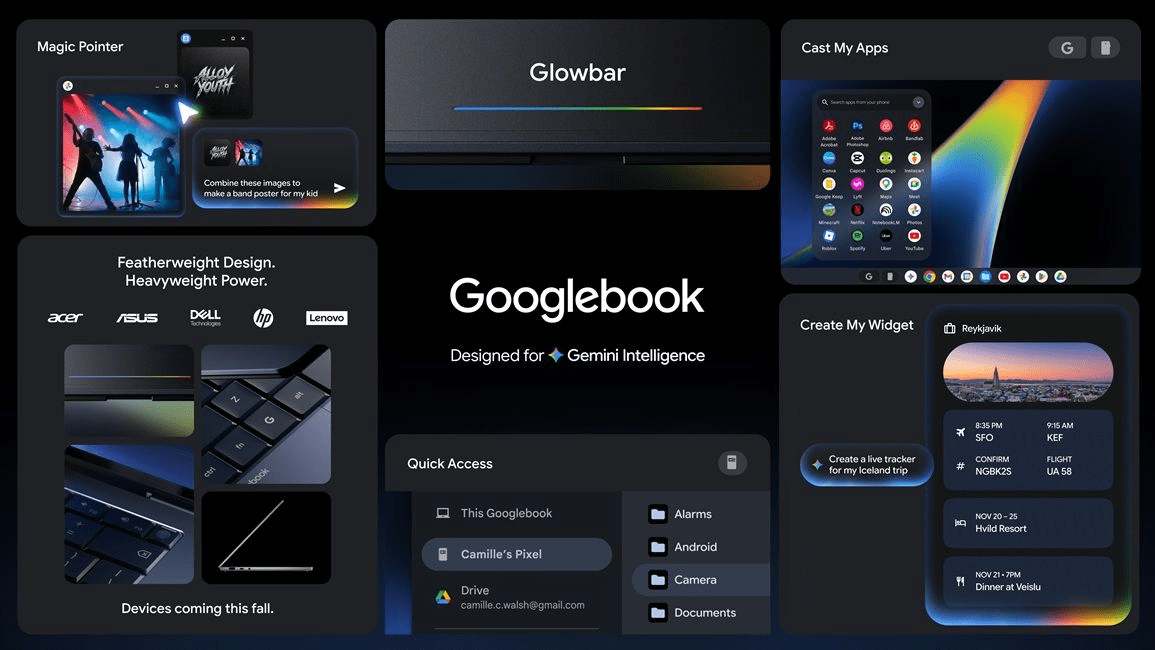
Now the landscape of personal computing has shifted toward a new horizon. Google announced the Googlebook on May 12, 2026—a brand-new category of laptops built from the ground up to center around its Gemini AI. Therefore, unlike the Chromebooks of the past or standard Windows machines, the Googlebook represents a total rethink of the portable computer. Moving away from a traditional operating system toward what Google calls an “intelligence system,” this device runs on Android while keeping the Chrome browser at its core. Meanwhile, its deep integration with Android phones and premium hardware partners suggests that the Googlebook is ready to challenge the status quo of modern workstations.
Also Read | Imran Khan and Bushra Bibi Sentenced to 17 Years in Jail
Beyond the OS: Defining the Googlebook ‘Intelligence System’
Now Google is describing the Googlebook not just as a new product, but as an entirely new category. Built with Gemini’s helpfulness at its core, it is designed to work seamlessly with the devices already in your life. Therefore, the goal is to create a laptop that actively tries to help the user rather than just acting as a passive screen.
First, by running on Android, the Googlebook gains access to the vast library of powerful apps on Google Play. Next, by keeping Chrome’s browser at its core, it maintains the world’s most popular web experience. Thus, the company is merging the best of mobile intelligence with desktop productivity.
So this shift away from traditional platforms marks a mechanical necessity for the AI-driven era of 2026. Meanwhile, the underlying software is designed to learn from user habits to provide a more tailored experience. Therefore, the Googlebook is positioned as a proactive partner in daily tasks.
The Magic Pointer: DeepMind’s Contextual Gemini Assistant
Now the headline feature that is drawing the most attention is the “Magic Pointer.” Developed in collaboration with the Google DeepMind team, this tool brings Gemini’s intelligence directly to the user’s fingertips. Therefore, the cursor is no longer just a selection tool; it is a contextual bridge to AI assistance.
First, by simply “wiggling” the cursor, users activate Gemini for quick, contextual suggestions based on what is on the screen. Next, the system recognizes specific data types—for example, pointing at a date in an email instantly triggers a meeting schedule option. Thus, the Magic Pointer allows users to go from a raw idea to a finished task in just a few clicks.
So the pointer can even handle visual tasks, such as selecting two images and instantly showing a composite of how they would look together. Meanwhile, this “idea-to-action” pipeline is designed to save hours of manual cross-referencing. Therefore, the Magic Pointer is the primary hardware-software interface that defines the Googlebook experience.
Synergy Realized: How Your Phone and Laptop Work as One
Now the Googlebook is designed to be the “best friend” of your Android phone. Through a feature called “Quick Access,” the friction of transferring files between devices has been entirely eliminated. Therefore, you can view, search, or insert your phone’s files directly on the laptop screen with no manual transfers required.
First, the system allows you to tap into any Android app directly from the laptop without even picking up your phone. Next, notifications and tasks transition fluidly between the two screens, maintaining a continuous workflow. Thus, the Googlebook acts as a natural extension of your mobile life.
So for “everyday people,” this level of integration solves a long-standing pain point in the tech ecosystem. Meanwhile, the cloud-based sync ensures that your workspace is always up to date across all hardware. Therefore, the phone-laptop barrier is effectively dissolved within the Googlebook ecosystem.
Also Read | Imran Khan and Bushra Bibi Sentenced to 17 Years in Jail
Personalized Dashboards: Using Gemini to ‘Create Your Widget’
Now customization has reached a new level with the “Create Your Widget” feature. Using simple Gemini prompts, users can generate custom widgets that connect to their specific needs and Google apps. Therefore, your dashboard is no longer limited to pre-made tools; it is a personalized command center.
First, Gemini can search the internet or your Gmail and Calendar to pull relevant data into a single widget. Next, these widgets stay updated in real-time, providing a live look at your most important information. Thus, the Googlebook offers a highly tailored interface that adapts to your professional and personal life.
So if you need a specific dashboard for a vacation or a work project, you can simply ask Gemini to “create it.” Meanwhile, these widgets are designed to look consistent with the modern Android design language. Therefore, the Googlebook UI is as dynamic as the user’s daily schedule.
Premium Hardware: The Signature Glowbar and Partner Ecosystem
Now Google is not building these devices alone. The company is working with industry-leading partners like Acer, ASUS, Dell, HP, and Lenovo to manufacture the first wave of Googlebooks. Therefore, users will have a choice of premium hardware configurations that suit different styles and budgets.
Googlebook Hardware Highlights:
-
Signature Glowbar: A functional design detail present on every model.
-
Premium Build: High-quality materials designed for a modern aesthetic.
-
Partner Variety: Options from the world’s most trusted PC manufacturers.
First, the “Signature Glowbar” is described as both beautiful and functional, likely acting as a visual indicator for AI processes. Next, the collaboration with major partners ensures that the Googlebook category has an immediate global reach. Thus, the hardware quality will match the sophisticated “intelligence system” running on it.
Chrome Meets Android: A Hybrid Software Powerhouse
Now the technical foundation of the Googlebook is a sophisticated blend of two established worlds. By bringing together the powerful apps of Google Play and the world’s most popular browser, Google has created a hybrid powerhouse. Therefore, the Googlebook avoids the limitations of being “just a browser” or “just a phone.”
First, the Android-based OS is specifically tuned for the intelligence requirements of 2026. Next, the Chrome browser remains the primary gateway for web-based productivity, ensuring full compatibility with existing websites. Thus, the software stack is optimized for both speed and versatility.
So the result is a laptop that feels familiar yet entirely new. Meanwhile, the deep integration with Google apps ensures that users are productive from the moment they sign in. Therefore, the Googlebook software represents a new peak in integrated mobile-desktop design.
Also Read | Imran Khan and Bushra Bibi Sentenced to 17 Years in Jail
Market Outlook: Pricing and Availability Expectations
Now while the features have been detailed, a few questions remain for potential buyers. The specific prices of the first Googlebooks have not been officially announced yet. Therefore, the market is currently speculating on where these premium devices will sit compared to high-end Chromebooks and Windows PCs.
First, given the “premium hardware” description, many analysts expect the Googlebook to occupy the mid-to-high tier of the laptop market. Next, the availability of multiple partners (Dell, HP, Lenovo, etc.) suggests there will be a variety of price points available at launch. Thus, the category is poised for a significant market presence.
So the official release dates are expected to be shared in the coming weeks. Meanwhile, the tech world is watching closely to see if this “Intelligence System” can disrupt the long-held dominance of traditional OS platforms. Therefore, the Googlebook launch is the most anticipated hardware event of the quarter.
FAQ: Frequently Asked Questions About the Googlebook
1. Is the Googlebook just a new type of Chromebook? Now, Google describes it as a brand-new category. While it uses Chrome, it runs on an Android-based “Intelligence System” designed specifically for Gemini AI.
2. What does the Magic Pointer do? First, it uses Gemini to provide contextual suggestions. Point at a date to schedule a meeting or point at images to see how they look together instantly.
3. Will my Android phone apps work on a Googlebook? So yes. The Googlebook allows you to use any Android app directly from your laptop screen with no phone transfers needed.
4. Who makes the Googlebook hardware? Next, Google is partnering with leading manufacturers including Acer, ASUS, Dell, HP, and Lenovo to build these devices.
5. What is the “Signature Glowbar”? Now, it is a design detail featured on all Googlebooks that is described as both functional and beautiful, serving as a signature look for the category.
6. When will the Googlebook be available? Finally, while the announcement was made on May 12, 2026, the specific release dates and prices are expected to be announced very soon.
Also Read | Imran Khan and Bushra Bibi Sentenced to 17 Years in Jail
End…

