

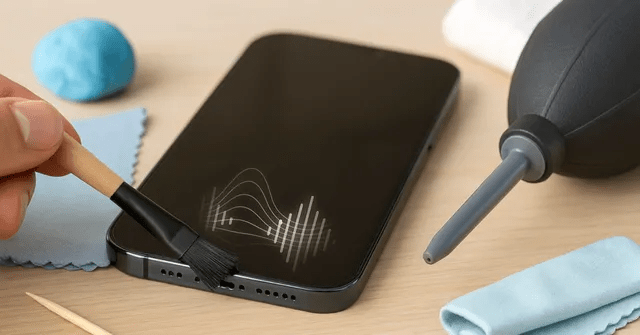
Now the frustration of a muffled smartphone speaker is a common experience for millions of users. If your audio suddenly sounds weak, dull, or too low during calls and videos, you might assume your hardware is failing. Therefore, before you consider an expensive repair, experts suggest looking closer at the speaker grille. Tiny particles like pocket lint, dirt, and skin oil often accumulate over time, creating a physical barrier for sound waves. Meanwhile, even water-resistant phones are susceptible to moisture trapment from humidity or sweat. Following a few simple, non-invasive cleaning steps can often restore your device to its original audio quality in just minutes.
Also Read | Imran Khan and Bushra Bibi Sentenced to 17 Years in Jail
Dust and Lint: The Silent Killers of Sound Quality
Now many users immediately think their phone speaker is defective when the volume starts to drop. However, repair experts point out that the most frequent cause is much simpler: physical blockage. Therefore, carrying your phone in pockets or bags daily exposes the delicate speaker mesh to a constant stream of debris.
First, tiny particles of lint and dust settle into the holes of the grille. Next, skin oils and sweat can act as a binding agent, turning that dust into a stubborn crust. Thus, the sound waves are physically obstructed, leading to that “underwater” or muffled audio effect.
So while the issue affects millions, it is rarely a sign of a damaged phone. Meanwhile, the blockage is often so gradual that you might not notice the decline until the sound is significantly distorted. Therefore, a visual inspection under a bright light is the first step in diagnosing the problem.
Moisture and Humidity: Why Water-Resistant Phones Still Struggle
Now it is a common misconception that a water-resistant rating protects your phone from all environmental factors. Even if your device has an IP68 rating, steam from bathrooms, humidity, or light rain can still impact audio. Therefore, moisture can become trapped within the speaker’s protective mesh.
First, moisture creates a temporary seal over the speaker holes. Next, this prevents air (and thus sound) from moving freely, making music and calls sound softer than normal. Thus, even a “clean” phone can suffer from audio issues if exposed to high humidity or sweat during a workout.
So if you have recently been in a humid environment, the “weak” sound might just be trapped liquid. Meanwhile, this is often temporary and can be resolved once the mesh dries. Therefore, allowing your phone to sit in a dry area is a mechanical necessity before jumping to a repair conclusion.
Step-by-Step Guide: How to Clean Your Speaker Grille Correctly
Now cleaning a smartphone speaker requires a delicate touch. Experts from consumer tech guides recommend a specific protocol to avoid damaging the internal components. Therefore, the goal is to lift the dirt out, not push it further in.
The Expert Cleaning Protocol:
-
Switch Off: Always power down your device before starting.
-
Soft Brush: Use a soft, dry toothbrush or a small paintbrush.
-
Gentle Sweeping: Hold the phone at an angle and sweep the brush across the holes.
-
Avoid Sharp Objects: Never use pins, needles, or metal tools.
First, the soft bristles help dislodge the lint without puncturing the mesh. Next, keeping the phone tilted ensures that the loosened dust falls out rather than deeper into the cavity. Thus, you can clear the majority of surface-level debris safely.
Also Read | Imran Khan and Bushra Bibi Sentenced to 17 Years in Jail
The Dangerous Mistake: Why You Should Never Blow Into the Grille
Now many users naturally try to blow air into the speaker to clear it out. However, online repair communities warn that this is a major mistake. Therefore, your breath contains a high amount of moisture that can cause more harm than good.
First, blowing air can push the dust deeper into the speaker assembly, making it even harder to remove. Next, the moisture in your breath can condense on the delicate speaker parts. Thus, you might accidentally introduce a liquid damage risk to a previously dry component.
So instead of using your mouth, stick to mechanical cleaning methods. Meanwhile, using high-pressure air can also damage the thin diaphragm inside the speaker. Therefore, the “blowing” method is something every smartphone owner should avoid.
Advanced Tricks: Using Compressed Air and Adhesive Putty
Now if a simple brush doesn’t do the trick, there are more effective “hacks” used by the tech community. If dust is stuck deep within the mesh, these methods can provide a deeper clean. Therefore, they are the next step before seeking professional help.
Advanced Cleaning Hacks:
-
Adhesive Putty: Reusable adhesive putty (like blue-tack) can be gently pressed onto the mesh to lift out dirt.
-
Adhesive Tape: Using the sticky side of high-quality tape can also pull lint from the surface.
-
Low-Pressure Air: Use canned compressed air from a safe distance and at a low angle.
First, the putty is excellent for grabbing skin oil and fine dust that brushes might miss. Next, the compressed air should only be used in short, controlled bursts to prevent diaphragm damage. Thus, these tools offer a more comprehensive cleanup for stubborn blockages.
Software Audit: Checking Settings Before Visiting the Repair Center
Now before you spend money on a replacement, it is vital to ensure the problem isn’t software-based. Sometimes, audio issues are caused by “invisible” settings or glitches. Therefore, a quick software audit is a mechanical necessity for troubleshooting.
The Software Checklist:
-
Restart: A simple reboot can fix many app-related audio glitches.
-
Bluetooth: Check if your phone is accidentally connected to a wireless speaker or headphones.
-
Do Not Disturb: Ensure this mode isn’t limiting your media or call volume.
-
Equalizer: Reset any custom sound profiles or “Quiet” modes in your settings.
First, a quick check of the “Sounds and Vibration” menu can reveal if a setting has been accidentally toggled. Next, testing the audio in different apps can help identify if the issue is restricted to one platform. Thus, you can rule out a hardware failure before taking the phone to a shop.
Also Read | Imran Khan and Bushra Bibi Sentenced to 17 Years in Jail
Hardware Longevity: The Importance of Routine Maintenance
Now as users keep their smartphones for four to six years, routine maintenance becomes increasingly important. Keeping your speaker grilles clear not only preserves sound quality but also prevents permanent damage. Therefore, a five-minute cleanup should be part of your monthly routine.
First, regular cleaning prevents dust from becoming so compacted that it requires professional intervention. Next, maintaining clear audio paths ensures that your calls remain audible and your media immersive. Thus, a small investment of time can extend the functional life of your device significantly.
So before you consider an expensive speaker replacement, try these simple tips. Meanwhile, many users find that their phone sounds almost new again after a thorough cleaning. Therefore, the secret to a “loud” phone is often just a bit of basic hygiene.
FAQ: Frequently Asked Questions on Muffled Phone Speakers
1. Why does my phone speaker sound muffled all of a sudden? Now, the most common cause is a buildup of pocket lint, dust, or skin oil in the speaker grille holes.
2. Is it safe to use a needle to clean my speaker? First, no. Sharp objects like needles can easily puncture the delicate speaker mesh and cause permanent damage.
3. Can I use water to clean the speaker if my phone is water-resistant? So it is not recommended. Water can trap moisture in the mesh and make the sound even more muffled until it dries completely.
4. How often should I clean my smartphone speaker? Next, a quick sweep with a soft brush once a month is usually enough to prevent significant buildup.
5. Does the “water eject” sound actually work? Now, yes. Certain frequencies can help vibrate moisture out of the speaker, but they are less effective against solid dust and lint.
6. What if my speaker still sounds low after cleaning? Finally, check your “Do Not Disturb” settings and equalizer. If the problem persists, it may be a software glitch or a genuine hardware failure.
Also Read | Imran Khan and Bushra Bibi Sentenced to 17 Years in Jail
End…

